An order goes from the table to the kitchen, and the bill to the hotel front desk. No paper tickets and no re-keying between systems.
Flexy POS
Point of sale
Available now
For venues and for every kind of shop — with barcode scanners, scales and label printers. Fast checkout, tables and tabs, splitting and merging, cash or card payment. Prints fiscal receipts on certified Bulgarian fiscal devices and keeps working even when the connection goes down.
Orders reach the kitchen instantly and in order. Track prep times, sort by priority and cut mistakes during the busiest hours — no paper, no lost tickets.
A screen facing the customer that shows what you ring up, the prices and the total in real time. Fewer questions at the till and more trust — on any tablet or monitor.
Reservations, check-in and check-out, room folios and automatic ESTI submissions. Restaurant spend goes straight onto the room folio, and ID scanning saves typing at reception.
Flexy Catalog — menu, products, prices and stock — from your computer, with a big screen and a keyboard
Coming soon
Flexy Booking — appointment booking for spas, barbershops, salons and group classes
Flexy ERP — finance, purchasing and warehouses for the whole business
Easy from day one
Easy for the team. Up and running in under 20 minutes.
Big buttons, clear screens and nothing in the way — a new waiter is working on their first shift. And getting up and running takes under 20 minutes — and we help you with the setup.
An interface that takes minutes, not days
Fewest taps possible
Table, order, payment — no deep menus and no wasted steps.
The same everywhere
Till, tablet and phone look the same. The team learns it once and signs in with the same PIN.
Everyone sees their part
Role-based access: waiters see tables and orders, managers see takings and reports.
In your team's language
The interface is in Bulgarian, English, Russian and Ukrainian, with Greek and Romanian coming soon. The language is set per employee and follows them to every device in the venue.
A size that suits you
Everyone on the team chooses how large the buttons and text are — easier on anyone who struggles with small print. Settings are saved per employee and follow them to every device in the venue: sign in with your PIN and the screen is just as you left it.
Three steps to your first receipt
1
Tell us about your venue
What you sell, how many tables and tills you have, which fiscal printer and card terminal you use.
2
We move your menu and help you set up
Your menu, products and stock come over from your current system. We help you connect the fiscal printer, card terminal and devices — on-site or remotely.
3
You start selling
The team signs in with a PIN and gets to work. After that you change the menu and prices yourself, any time — in Flexy Catalog.
Everything your business needs — in one place
From the sale to stock and reports — the things that keep the venue running every day.
Reports that show who did what
Detailed reports on sales, discounts and voids — by employee, by shift and by venue. See who rang up, discounted or voided what, and when.
Inventory management
Built-in inventory in Flexy Catalog: log deliveries, run stock-takes and write-offs, and track ingredient usage by recipe. Stock levels update with every sale.
Order from a phone
Take orders right at the table — on a phone or tablet. They reach the kitchen instantly, with no trips to the till.
Split and merge bills
Everyone pays their own, or the whole party on one bill — in a few taps. Cash, card or a mix.
Invoices in a few taps
Issue an invoice straight from the bill — no re-typing items into another program. Quick for the cashier, tidy for the accountant.
And more on the way
Flexy is growing fast and new capabilities ship regularly. Tell us what you are missing — write to [email protected].
Use what you already have
The tablets, phones and computers already in the venue, and the internet you already pay for. No new hardware and no extra connection fees.
Works on any internet
Mobile or fixed internet from any provider, even Starlink — with no static external IP, which usually costs extra every month. No open ports, and the connection is encrypted end to end.
Any device
Use Flexy on the kit you already own — Android and iOS tablets and phones, or Windows, macOS and Linux computers. It all opens in a browser, with no installation and no lock-in to specific hardware.
Support after go-live
You are not left on your own once you are live. We help on-site or remotely — you run the venue, we keep Flexy running.
The same Flexy on every screen
The same interface on the till, a tablet and a phone — your team learns it once and signs in with the same PIN everywhere.
Flexy
1 2 3 4 5 6 7 8 9 C 0 ⌫
Till / desktop
Flexy
1 2 3 4 5 6 7 8 9 C 0 ⌫
Tablet
Flexy
1 2 3 4 5 6 7 8 9 C 0 ⌫
Phone
Datecs BlueCash-50
Android · cloud-direct
Also: BlueCash-500 · Daisy Smart S
Windows · macOS · Linux · Android · iOS
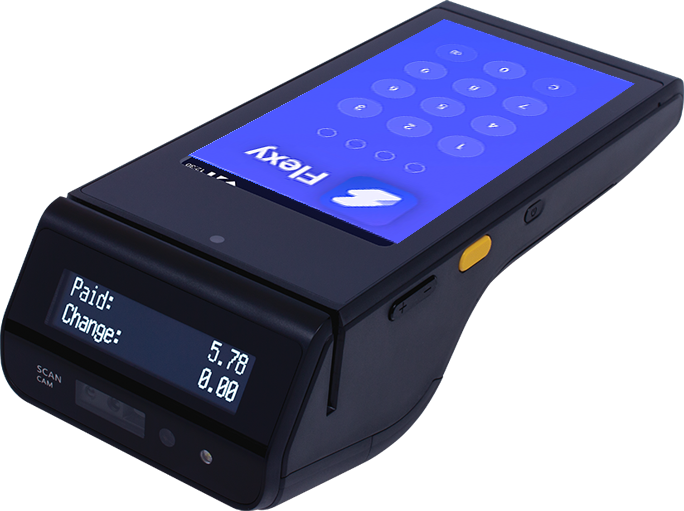
On the Datecs BlueCash-50, Datecs BlueCash-500 and Daisy Smart S Android cash registers, Flexy runs as a native app — till and fiscal printer in one device, connected straight to the cloud, with no on-site server. The BlueCash-50 adds the card terminal to the same device and works anywhere on mobile data.
Because the work cannot wait
No empty promises. Just the things that matter when it gets busy.
Cloud
Connected Internet is down Syncing
Your venue
Sales carry on
Works without the internet — and without power
When the connection drops, the till does not — data waits and uploads itself the moment the network is back. When the power goes out, tablets and phones carry on on battery, and the Datecs BlueCash-50 keeps selling and printing fiscal receipts on its own battery and mobile data.
Your data is safe
Everything is backed up automatically — sales, menus, stock and bills. Data is hosted in the EU, the connection is encrypted end to end, and access is by role with a personal PIN. The data is yours: if a tablet or computer breaks, nothing was stored on it — sign in on another device and carry on where you left off.
Automatic backups
Encrypted connection
Hosted in the EU
Your data stays yours
Follow the venue from an iPhone, iPad or Mac, from Android, or from a Windows or Linux computer.
NRA-compliant
Connects to your cash register or fiscal printer — Datecs, Daisy, Incotex, Eltrade and Tremol. Receipts and reports by the NRA book, with no manual workarounds and no surprises during an inspection. If your device is not supported yet, we will add support for it — tell us what you use.
Card payments straight from the till
Flexy works with card payment terminals — Datecs Pay, viva.com and most major bank terminals. The bill amount goes to the terminal by itself, with no re-keying, and the payment is recorded in Flexy. Fewer mistakes at the till and faster service at the table.
Run your venue from anywhere
The Flexy admin panel goes wherever you go — on an iPhone or Android phone, an iPad, or a Mac or Windows computer. Watch takings and sales in real time, check stock and who rang up what, change prices and menus — without being on site.
Franchise-ready
Run several sites or legal entities from one account. Made for franchises and growing brands — one overview from the top, separate settings per site.
Frequently asked questions
What operators ask most before switching to a new system.
What is Flexy?
Flexy (Флекси in Bulgarian) is management software for restaurants, cafes, bars, shops and hotels, built for the Bulgarian market. It includes Flexy POS (point of sale) — which comes with Flexy Catalog (menu and stock), Flexy KDS (kitchen display) and Flexy CFD (customer display) — and Flexy PMS (hotel software), with Flexy Booking for spas, barbershops and group classes coming soon. It works with Bulgarian fiscal devices and card payment terminals, keeps running without the internet, and data is hosted in the EU.
Is it compliant with the NRA and SUPTO requirements?
Yes. Flexy issues fiscal receipts through certified Bulgarian fiscal devices and follows NRA requirements. Reports and records are by the book and ready for an inspection.
Which fiscal printers does it support?
It works with certified Bulgarian brands — Datecs, Daisy, Incotex, Eltrade and Tremol. If you already own a device, in most cases you can use it directly. On the Datecs BlueCash-50, BlueCash-500 and Daisy Smart S Android cash registers, Flexy runs directly on the device itself.
Does it work with card payment terminals?
Yes. Flexy works with Datecs Pay and viva.com terminals, as well as most major bank terminals — the amount is sent from the till to the terminal with no re-keying. On the Datecs BlueCash-50 the till, card terminal and fiscal printer are one device. Using a different terminal? Get in touch.
Does it work without the internet?
Yes. An on-site box runs the till and printing even when the connection drops. Sales and tabs carry on, and data syncs itself the moment the network is back.
What happens if the power goes out?
The till keeps going. Tablets, phones and laptops run on battery, and the Datecs BlueCash-50 — till, card terminal and fiscal printer in one — keeps selling and printing receipts on its own battery and mobile data. If you use a mains-powered fiscal printer, a small UPS keeps it running until the power is back.
Is my data safe, and is it backed up?
Yes. Everything is backed up automatically, data is hosted in the EU and the connection is encrypted end to end. Access is by role with a personal PIN, so each member of staff sees only what they should. The data stays yours — if a device breaks or goes missing, sign in on another one and carry on.
Can I monitor and manage the venue when I am not there?
Yes. The Flexy admin panel shows takings, sales, stock and staff activity in real time — on a phone, tablet or computer, from anywhere. From there you change prices and menus and set permissions, and with several venues you see them all in one place.
Does it work on iPhone, iPad and Mac?
Yes. Flexy runs in the browser on iPhone, iPad and Mac, as well as Android, Windows and Linux — with no installation. Waiters take orders on a phone, the kitchen follows them on an iPad, and you check takings from your Mac or phone.
What languages is Flexy available in?
The Flexy interface is in Bulgarian, English, Russian and Ukrainian, with Greek and Romanian coming soon. Each employee picks their own language and it follows them to every device in the venue — handy when part of the team are not native Bulgarian speakers.
Does it work with the euro?
Yes. Flexy has worked with the euro since it was introduced — dual price display where still required, and correct rounding under the official rules, with no manual workarounds.
Can I manage several venues or a franchise?
Yes. Run several sites or legal entities from one account — one overview from the top and separate settings per venue. Built for chains and franchises.
Is it hard to switch from another system?
No. Migration is fast and easy — we move your menu, products and stock from your current system for you and help you go live with no disruption to the floor.
Do we need a static IP or special internet?
No. Flexy works on any internet connection — mobile or fixed internet from any provider, even Starlink. There is no need for a static external IP, which usually costs extra every month. We open no ports and the connection is encrypted end to end.
Do the kitchen and customer displays cost extra?
No. Flexy POS includes Flexy Catalog for menu and stock, Flexy KDS for the kitchen and Flexy CFD for the customer display — at no extra cost.
How do I get started and see a demo?
Write to us at [email protected]. We will get in touch, learn how your business runs and show you Flexy live — with no lock-in.
Request a free demo
Leave your details and we will get in touch within one business day. We will learn how your business runs and show you Flexy live — with no lock-in.
Analytics cookies
We use Google Analytics to understand which pages are useful. It only loads if you agree. Declining changes nothing about how the site works. More in our Privacy Policy